You are here: Home > NUUO Surveillance Systems > NVR Titan > Nuuo Titan NVR Support > Nuuo Titan NVR Time / Date Setup

Nuuo Titan NVR Time / Date Setup

Nuuo Main Console

The instructions featured in this article explain how to setup the time and date on the NUUO Titan NVR. For this article we will be configuring it from the Internet Explorer web browser interface. The examples in this article were done using an NT-4040 NUUO Titan Network Video Recorder


Nuuo Titan NVR Time / Date Setup

Please follow the instructions below to setup the time and date on the NUUO NVR Titan.

  1. Login to the NVR Titan through the Internet Explorer web browser interface (Not the NuClient Software).

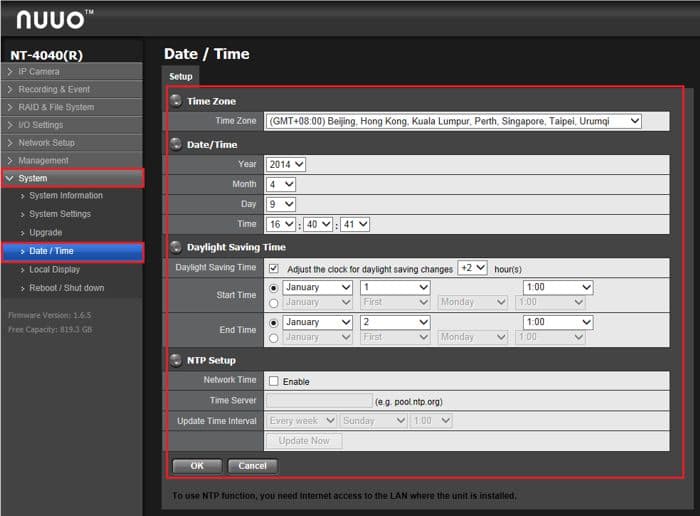
  2. Now click the System tab on the left followed by Date / Time. From this menu you are able to setup the time, date and daylight savings schedule. Once you have the correct settings entered, click OK to save the settings. (Shown Below)