The Viewtron IP-HDMI-D4 is a IP security camera to TV decoder that turns any IP camera into an HDMI security camera via RTSP to HDMI conversion. Although CCTV Camera Pros highly recommend our Viewtron IP cameras for use with this decoder, it will work with any other brand of IP camera that supports RTSP streaming (most do). RTSP = Real Time Streaming Protocol. If you want to use this decoder with a non-Viewtron brand IP camera and need help determining if it will work, please email us at
[email protected]. If you do not yet have an IP camera, we HIGHLY recommend our Viewtron IP cameras for use with this product.
The IP-HDMI-D4 is a great solution for customers that want to connect a security camera to a TV for a live view without a DVR. It can also be used in conjunction with a DVR or NVR to enable live view monitors that
display 1 to 4 IP cameras in addition to recording video to the video recorder. You can also customize the camera display size and screen display layout. And because the Viewtron IP-HDMI-D4 works over an IP network, your IP camera(s) do not need to be installed anywhere near your HDMI TV monitor. The video is transmitted over your local network or remotely over the Internet. Check out these installation diagrams to see the various ways that this IP camera decoder can be installed. You can also watch this overview video and this installation setup video to learn more.
Wireless IP to HDMI Converter also available

CCTV Camera Pros now also has a 4K resolution IP camera to HDMI converter with built-in WIFI. The Viewtron IP-HDMI-D4K model has all of the same features as the IP-HDMI-D4, but it supports 4K HDMI resolution output in addition to 1080p resolution. And, it can connect to your network via a wireless router or access point, in addition to also having an hard wired RJ45 Ethernet connection.
IP Camera to TV Decoder Use Cases
Here are some of the ways the Viewtron IP Camera to TV decoder can be installed for home, business, and government live TV display applications.
Watch this video to learn about all the different ways the Viewtron decoder can be used with one or more IP cameras displaying live video on one or more TV monitors.
Watch this video to learn see how to setup the IP to HDMI decoder to display a live view of one security camera that is connected to a
Viewtron DVR / NVR. Please note that this live display solution works with Viewtron IP camera NVRs, hybrid CCTV DVRs, and directly with IP cameras without a DVR.
Specification / Features
- Supports all IP camera brands via RTSP Stream (RTSP to HDMI conversion)
- Supported IP Camera Resolutions: 720p / 1mp, 1080p, 2mp, 3mp, 4mp, 5mp, 8mp / 4K
- Supports up to 4 video streams / 4 IP cameras / 4 HDMI to IP Encoders
- Screen Layouts: 1 Camera, 2 Camera , 3 Camera, 4 Camera video displays supported
- Custom Screen Layouts Supported
- Supports pairing with HDMI to IP Encoder to Display entire DVR HDMI output. No limit on the number of cameras displayed via HDMI to IP Encoder pairing.
- Supported HDMI Output Resolutions: 480p @ 60Hz, 576p @ 50Hz, 720p @ 50Hz, 720p @ 60Hz, 1080p @ 50Hz, 11080p @ 60Hz, 1024 x 768 @ 60Hz
- Audio Support
- 12V DC Power Supply Included
Here are some of the may ways that the Viewtron security camera IP to HDMI decoder can be used with and without a DVR.
This is how the IP-HDMI-D4 decoder can be used to connect one IP camera to a TV over a local network without a DVR / NVR. This solution is great for customers that do not require any video recording to a DVR and just want a live view of their security camera.

This is how it works.
- The Viewtron IP camera is connected to the network switch or router using CAT5 or CAT6 network cable.
- The Viewtron IP-HDMI-D4 decoder is connected to the same local area network as the IP camera. This can be done by connecting it to the same network switch or router via network cable (CAT5 or CAT6).
- The IP decoder can now connect to the IP cameras video stream over the local network and convert the video into an HDMI signal.
- The HDMI output of the decoder box is connected to an HDMI input on the TV using a standard HDMI cable.
When the user wants to see their security camera live on the TV, they can simply select the HDMI input on the TV.
**Please note: the IP camera can be powered via PoE (Power over Ethernet) or 12V DC power supply. If using PoE, you can use a PoE switch or a PoE injector if you are connecting the camera to a non-PoE switch or router. You can also put a PoE switch between the router and the camera.
The Viewtron IP-HDMI-D4 decoder can also be used to connect multiple IP camera to a TV over a local network without a DVR / NVR. The IP-HDMI-D4 supports up to 4 IP camera video streams. This solution is great for customers that do not require any video recording to a DVR and just want a live view of multiple IP cameras in a 1, 2, 3, or 4 camera live view video layout.

This is example of how it works with 4 IP cameras.
- One to four Viewtron IP camera are connected to a network switch or router using CAT5 or CAT6 network cable. Please note that the cameras cam be connected to a different network switch as long as they are all on the same network.
- The Viewtron IP-HDMI-D4 decoder is connected to the same local area network as the IP camera. This can be done by connecting it to the same network switch or router via network cable (CAT5 or CAT6) or a separate switch as long as it is on the same network as the cameras.
- The IP decoder can now connect to all of the IP camera video streams over the local network, combine the video streams, and convert the output into an HDMI signal to display a live view of all the cameras at the same time.
- The HDMI output of the decoder box is connected to an HDMI input on the TV.
When the user wants to see their security cameras live on the TV, they can simply select the HDMI input on the TV that is connected to the decoder box.
**Please note: the IP cameras can be powered via PoE (Power over Ethernet) or 12V DC power supply. If using PoE, you can use a PoE switch or a PoE injector if you are connecting the camera to a non-PoE switch or router. You can also put a PoE switch between the router and the camera.
Spot Monitor for Multiple IP Cameras
Watch this video to see how Mike setup the IP-HDMI-D4 as a spot monitor for two IP cameras installed at his house. The unique two camera multiplexer view looks great with two of these Viewtron 180 degree security cameras.
The Viewtron IP-HDMI-D4 decoder can also be used with a Viewtron DVR / NVR to access your IP camera video streams. This allows you to use the decoder with a Viewtron DVR or Viewtron NVR for recording and to use the IP camera video streams for a live view on a TV. Viewtron DVRs and NVRs provide the RTSP video streams that the Viewtron decoder requires. This solution is great for customers that do want video recording to a DVR and just want a live view of one or more security cameras on a TV that is not located near the DVR.

This is example of how the Viewtron decoder works with
Viewtron DVRs and Viewtron NVRs.
- Your Viewtron IP camera are connected to the PoE ports on the back of the Viewtron NVR using CAT5 or CAt6 network cable. All of the video recording operations, motion detection, AI events, etc. are configured on the NVR as they normally are.
- The Viewtron NVR is connected to a network switch or router using CAT5 or CAT6 network cable.
- The Viewtron IP-HDMI-D4 decoder is connected to the same local area network as the Viewtron NVR. This can be done by connecting it to the same network switch or router via network cable (CAT5 or CAT6) or a separate switch as long as it is on the same network as the NVR.
- The IP decoder can now connect to all of the IP camera video streams over the local network via the NVR (instead of directly to the IP cameras).
- The IP decoder combines the video streams from all cameras and convert the output into an HDMI signal to display a live view of all the cameras at the same time (video multiplexer). You can use 1 to 4 cameras.
- The HDMI output of the decoder box is connected to an HDMI input on the TV.
When the user wants to see live view of their security cameras on the TV, they can simply select the HDMI input on the TV that is connected to the decoder box.
Here is an amazing use case for the Viewtron IP camera decoder. You can setup a live view of an IP camera on a TV using an IP camera that is off-site at a different location.

This is how you can setup the Viewtron decoder to display a live view of an IP camera from remotely over the Internet.
- In this diagram the gray box on the left is a separate physical location (Site A) from the white area on the right (Site B).
- The IP camera at Site A is connected to the network router at that location using CAT5 or CAT6 network cable.
- Port forwarding is setup on the router at Site A to allow access to the camera's RTSP video stream.
- The Viewtron IP-HDMI-D4 decoder is located at Site B and is connected to a network router at that location.
- The Viewtron decoder is configured to connect the the security camera's RTSP stream using it's port forwarded URL.
- The IP decoder can now connect to the IP cameras video stream from remotely over the Internet and convert the video into an local HDMI signal.
- The HDMI output of the decoder box is connected to an HDMI input on the TV.
When the user wants to remotely see a live view of their security cameras on the TV, they can simply select the HDMI input on the TV that is connected to the decoder box.
You can pair the Viewtron IP-HDMI-D4 with this
Viewtron RTSP to IP encoder to can send the entire live video display of your Viewtron DVR or NVR to one or more monitors on your local network. Please note that we sell an HDMI over Ethernet kit that includes the encoder and decoder together. This basically creates a "spot monitor over IP network solution". You can also send your DVR's HDMI video display to a monitor on-site where the DVR is located and / or to a remote location over the Internet if you setup port forwarding on your router. You can display a live view of all of the security cameras on your system to a local or remote monitor over IP network.

This is how it works.
- The Viewtron IP cameras are connected to a Viewtron NVR for typical security recording and operations. Please note that you can also use a Viewtron hybrid BNC DVR with CCTV / analog HD cameras for this application instead of an IP camera system.
- The HDMI output of the DVR or NVR is connected to the HDMI input of the Viewtron IP-HDMI-E1 encoder.
- The Viewtron IP-HDMI-E1 is connected to a network switch or router using CAT5 or CAT6 network cable.
- A Viewtron IP-HDMI-D4 IP to HDMI decoder is connected to the same local area network as the encoder. This can be done by connecting it to the same network switch or router via network cable (CAT5 or CAT6).
- The IP decoder can now connect to the IP video stream of the IP-HDMI-E1 encoder over the local network and convert the video into an HDMI signal.
- The HDMI output of the decoder box is connected to an HDMI input on the TV using a standard HDMI cable.
When the user wants to see their security camera live on the TV, they can simply select the HDMI input on the TV.
You can use more than one Viewtron IP-HDMI-D4 decoders if you want to display a live view of your IP camera(s) on more than one TV. You can have a one to many relationship between your IP camera and live display monitors.

This is how it works in the above example.
- The Viewtron IP camera is connected to the network switch or router using CAT5 or CAT6 network cable.
- Two Viewtron IP-HDMI-D4 decoder boxes are connected to the same local area network as the IP camera. This can be done by connecting it to the same network switch or router via network cable (CAT5 or CAT6).
- Both IP decoders can now connect to the IP cameras RTSP stream over the local network and convert the video into an HDMI signal.
- Each HDMI output of the decoder box is connected to an HDMI input on a TV using a standard HDMI cable.
When the user wants to see their security camera live on either TV or both, they can simply select the HDMI input on the TV.
You can also use multiple IP decoders with one
Viewtron HDMI to RTSP encoder so that you can send the HDMI output of your DVR or NVR to one than one monitor. This creates a one-to-many "spot monitor over IP network solution". You can send your NVR or DVR's HDMI video display to multiple monitors on-site where the DVR is located and / or to a remote monitor location over the Internet if you setup port forwarding on your router.

This is how it works.
- The Viewtron IP cameras are connected to a Viewtron NVR for typical security recording and operations. Please note that you can also use a Viewtron hybrid BNC DVR with CCTV / analog HD cameras for this application instead of an IP camera system.
- The HDMI output of the DVR or NVR is connected to the HDMI input of the Viewtron IP-HDMI-E1 encoder.
- The Viewtron IP-HDMI-E1 is connected to a network switch or router using CAT5 or CAT6 network cable.
- Multiple Viewtron IP-HDMI-D4 decoders are connected to the same local area network as the encoder. This can be done by connecting it to the same network switch or router via network cable (CAT5 or CAT6).
- The IP decoders can now connect to the IP video stream of the IP-HDMI-E1 encoder over the local network and convert the video back into the HDMI output of the DVR.
- The HDMI output of the decoder boxes are connected to the HDMI input of each TV using a standard HDMI cable.
When the user wants to see the HDMI output of their security camera DVR live on the TV, they can simply select the HDMI input on the TV.
The Viewtron IP-HDMI-D4 supports one, two, three, and four camera screen layouts. You can also customize the size and location of each camera on the display. Please see examples of the video display layouts below. You can click on any of the images to see the full 1080p resolution image.
Single Security Camera TV Display

This is a screen capture of the single camera live video display.
Two Security Camera TV Display

This is a screen capture of the default two camera live video display, with the two cameras with standard 16:9 aspect ration, side-by-side.
Two Security Camera TV Display: Full Screen Width

This is a screen capture of a custom two camera live video display, with the two cameras stretched to the full screen width, and stacked one on top of the other. This 2 camera layout works great with our
Viewtron 180 degree security camera because of it's native ultra wide aspect ratio. Both of the cameras used for this output were Viewtron 180 IP camera model.
Three Security Camera TV Display

This is a screen capture of a default three camera live video display. Camera #1 is the
Viewtron 180 degree security camera which is show stretched to the full TV width in the next example.
Three Security Camera TV Display, 180 Camera Full Width

This is a screen capture of a default three camera live video display with Camera #1 (the Viewtron
180 camera) stretched to the full HDMI width.
Four Security Cameras to TV Live Display

This is a screen capture of the four camera live video display layout.
You can adjust the size of each camera's video display and also custom the layout of the entire display.

This is the default 2 camera layout. To customize it, click on the Channel Layout link in the Advanced settings on the left.

Select Enable on the Video Channel Layout drop down box. Now you can drag each camera on the screen layout and also resize them. In this example, we stretched both cameras to the full TV width. This works very well with our Viewtron 180 security cameras.
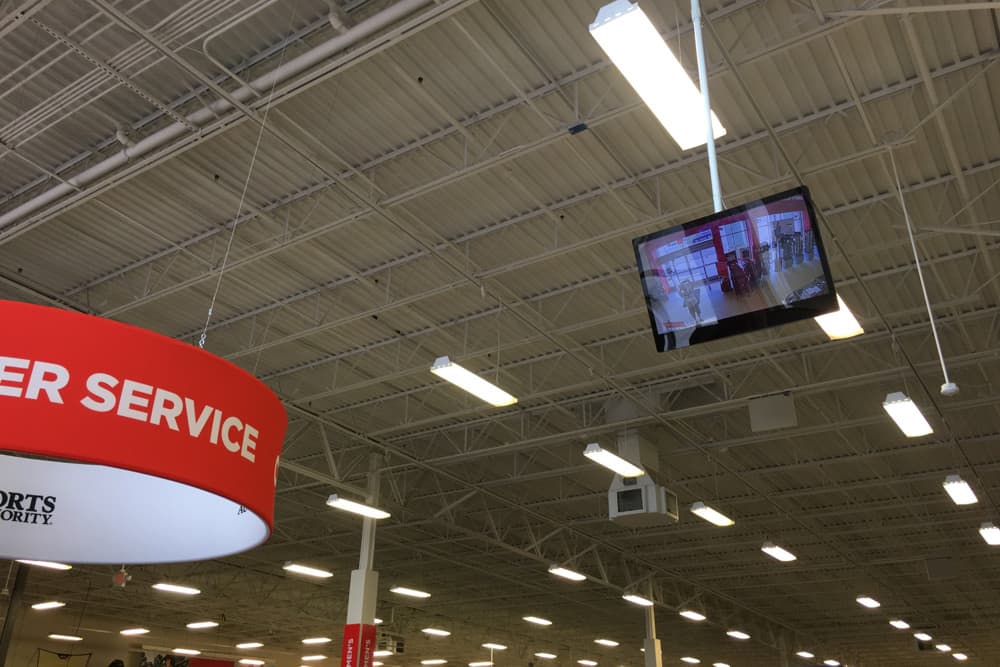
Here you can see an example of how the Viewtron IP-HDMI-D4 decoder is used to provide a live view security camera monitor at a retail store entrance. The video stream from this IP camera is sent to decoder for the live display and it is also used by the NVR to record video surveillance footage. The NVR is installed in a server rack in the back of the store.
Free System Consultation & Quotes
Although the Viewtron IP-HDMI-D4 decoder is a simple product in concept, it can be used many different ways, with and without a recorder. You can use multiple decoders for multiple live display security camera monitors. You can use the video streams from IP cameras on site and at remote locations. There are many different Viewtron IP camera choices. CCTV Camera Pros offers free email and phone consultations, and free PDF file quotes. Please call, text, or email us anytime of you have any questions or would like to schedule a phone consultation.

This product is NDAA compliant. That means that it is not manufactured by any of the manufacturers on the NDAA (the National Defense Authorization Act) list of banned manufacturers. This security camera does not use any materials from banned manufacturers either. This product may safely be purchased for government use.

CCTV Camera Pros is proud to have an
A+ rating at the Better Business Bureau and an average of 5 star reviews at Reseller Ratings. We were able to achieve this through the outstanding technical support and customer service that our team provides to our customers.

CCTV Camera Pros is proud to be a US Veteran Owned small business. Our co-founder, Mike Haldas, served in the United States Marine Corps 1993-1997.
Related Articles











 IP Security Camera to TV Live View Video Display






