Geovision Video Record Resolution Setup Geovision surveillance systems can be set up to record video using a number of different video resolutions. The greater the resolution that you set up on your system, the better the video quality is during playback. Also please note that the greater that you set the resolution, the more hard disk space that is required to store your video. These setup instructions cover how to change the video resolution that your Geovision system is recording at Geovision surveillance systems can be set up to record video using a number of different video resolutions. The greater the resolution that you set up on your system, the better the video quality is during playback. Also please note that the greater that you set the resolution, the more hard disk space that is required to store your video. These setup instructions cover how to change the video resolution that your Geovision system is recording at
Surveillance Video Resolution Record Setup
- Start your Geovision system if it is not already running.
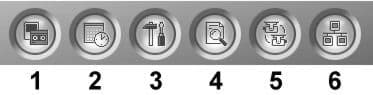
- From the System Menu on your Geovision DVR, click on the Configure button (#3 below).
-
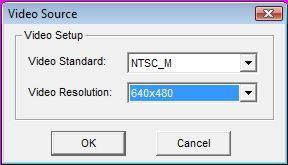
From the configure menu, select A/V Setting then select Video Source. The Video Source screen will open as seen below.
-
On the Video Setup screen, choose the video standard you want to use. Select NTSC_M for a system in the US. Select PAL_B for systems in Europe.
-
For Video resolution choose from 320x240, 640x480, and 720x480 modes. 320x240 is the smallest size and uses the least hard drive space. 720 x 480 is the highest resolution and uses the most hard drive space.
-
Press OK when done.
You are now done adjusting the recording resolution of your Geovision security camera system.
|












