View CartMy Account / Order StatusHelp

Team Viewer Remote Support Software
Download Support Software
TeamViewer for Windows
TeamViewer for Mac



GSA Schedule 84 Contract

US Veteran Owned Business

CCTV Camera Pros, LLC is a BBB Accredited Business. Click for the BBB Business Review of this Video Equipment - Sales & Rentals in Boynton Beach FL


Free UPS Ground Shipping on Orders over $199


Join our mailing list!


Email Us sales@cctvcamerapros.com

(Your shopping cart is empty)
You are here: Home > Geovision Surveillance Systems > Geovision Card Support > Audio Surveillance Playback

Geovision Audio Surveillance Playback

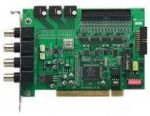
Geovision DVR CardAudio surveillance can be played back and reviewed using your Geovision DVR if you have properly setup Geovision for audio recording.  Audio playback is done using the same video log viewer that is used to play back video surveillance that our system captures.  There are just a few settings that you must confirm are enabled in order to hear the audio surveillance that your Geovision has recorded.

bookmark this page for future reference

To enable audio surveillance playback, please follow these steps.
  1. Start your Geovision system if it is not already running.
  2. Confirm that you have audio speakers connected to your Geovision computer and that they are working properly.
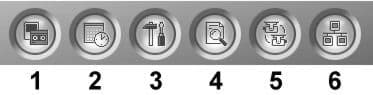
  3. From the System Menu on your Geovision DVR, select the View Log button (#4 below).

    Geovision Menu

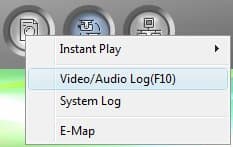
  4. From the View Log menu, select Video / Audio Log as seen below.

    Select View Log

  5. On the View Log Screen, click on the Configure button.


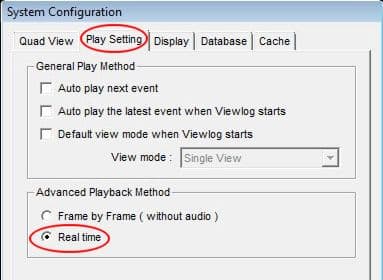
  6. On the View Log System Configure screen, click on the Play Setting tab and make sure that the Real Time option is selected under Advanced Playback Method.

    Geovision Enable Audio Playback

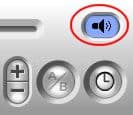
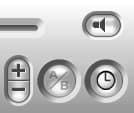
  7. Last, confirm that the Audio is turned on for playback.  On the Geovision View Log screen, the small speaker icon should have audio coming out of it like the one pictured blow on the left.  If it looks like the one on the right click on it to turn the speakers on.

    Geovision Sound On    Geovision Sound Off  
Your Geovision system is now setup top playback audio surveillance.  Use the method of search that you normally do to playback video.

bookmark this page for future reference
CCTV Camera Pros
7142 Seacrest Blvd.
Lantana, FL 33462
 About Us
 Links
 Privacy Policy
 Send Us Feedback